November 29, 2009
SUCCESS: I've recovered data from my hdd
So if you have this problem, drop me a message in comments to get details on procedure, I will try to help you.
UPD: here's cool video guide (using Nokia USB cable and they disconnecting head block while I disconnected spin motor - result seems to be the same).
Labels: 7200.11, BSY, data recovery, hdd, maxtor, seagate, success story


November 24, 2009
How to check your Seagate/Maxtor HDD for firmware problem
If you like to check whether your hdd is affected by a Seagate/Maxtor firmware fault, use this short tutorial.
Enter your drive's serial number here into: Seagate's firmware update check tool (https://apps1.seagate.com/rms_af_srl_chk/). After that, follow the instructions. If you see "No action required", your drive is not affected by the firmware fault.
How to know your drive's serial:
Linux
I use startctl (http://smartmontools.sourceforge.net).
smartctl -i /dev/sdX
(press TAB after dev/sd and enter your drive number from the given list, for example /dev/sda. However on different distros hdd filename differs, so ou may need to refer to docs). In output of command you'll see your serial:
Serial number: 9RA21232
Windows
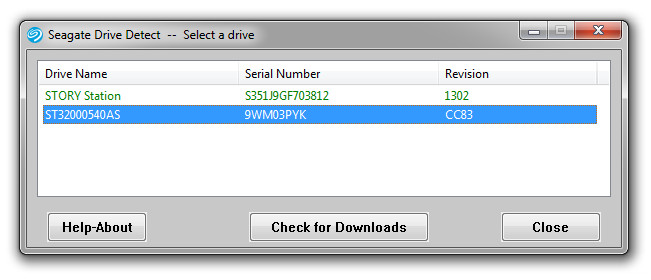
I use Seagate DriveDetect.
Here's a screenshot of how output should look like.
In any case, back your data up regularly!
November 22, 2009
I had Maxtor HDD failure: factory problem, bad firmware
I have Maxxtor Diamond Max 22 500Gb (STM3500320AS model with "mx15" firmware).
The problem this model has is same as in Seagate 7200.11 series: some counters in system area overflow... and microcontroller disables all IO operations to prevent data loss (which is, of course, logicallly thinking, good idea. But the criteria does not seem to be the right). Therefore, all data is stored OK inside bricked HDD.
Symptops: HDD BUSY led are being turned on during computers seeks for HDD on startup, this process is VERY long and ALWAYS ends with either a message "boot device not found" (if affected HDD is a system one), or system loads, but affected HDD is not detected by the system (at all, not only partitions, but THERE'S NO ANY HDD detected, even with specialized Seagate's Tools, or DriveDetect utils).
This is it, so-called "BSY" failure. The HDD is brick now :-)
Now I've restored my system partition from backup and waiting for my friend to solder the RS232-to-TTL (COM - to - service connector) signal convertor. I've also found the needed Seagate service commands to unbrick the HDD with BSY error.

Please check whether your HDD is affected and in any case: BACK your data UP regularily!
