March 23, 2012
macos file system is _case insensitive_
For some reason the default (pre-installed) HFS in last macbook Air (with 10.7.2) is case-insensitive. For example, you cannot create two files: doc and Doc - they are same. BUT: depending of which file was created first, you won't be able to access using different-cased name...
In short: create is case-insensitive, access is case-sensitive. Very annoying behaviour.
In short: create is case-insensitive, access is case-sensitive. Very annoying behaviour.


March 20, 2012
macosx has legacy file system: 31 char filaneme length limit!
Mac os x 10.7 (lion) by default (pre-installed OS on Air) has filename length limit of 31 chars (with extension). With manuals (pdf documents) being downloaded from support.apple.com frequently violateing that limit makes me wonder why the hell are they using such a legacy FS. This reminds me of world of windows 3.1 and OS/2 (when on old good FAT16 with its 8.3 char limit; native OS/2 HPFS didn't have such limit).
Want/have Macos, still hope for good usability?! Give them money, forget about usability, it's apple's concern now. They are going to pay dividends to shareholders this year, that's where apple's real usability lies. Definitely not in hell bunch of 'little' mac os x issues.
Want/have Macos, still hope for good usability?! Give them money, forget about usability, it's apple's concern now. They are going to pay dividends to shareholders this year, that's where apple's real usability lies. Definitely not in hell bunch of 'little' mac os x issues.
one more macosx uncomfortability: no way to [free] maximize window
When you switch apps by Command-Tab it's no way to say whether there's no app window at all or it was minimized. Moreover, there's no way to maximize window from keyboard. It's very uncomfortable when using auto-hide option for dock (cause you don't see without moving mouse and waiting for dock to explode the list of minimized windows). There's an article on this problem and there's only paid ($10) option to use some app for shortcuts. I hate this apple world. Like "We will bite your ass a little until you pay $10 for every point".
Actually apple's "we know UI better" is just "we know how to have your money" bullshit. Beware: Apple only have the smell of usability, not usability actually. Although they make nice thin 'air' laptops which don't get very hot like Acers do :) So you can get one and just install Windows/linux on it.
Making now Windows7 installation disk for BootCamp to install win on macbook.
Actually apple's "we know UI better" is just "we know how to have your money" bullshit. Beware: Apple only have the smell of usability, not usability actually. Although they make nice thin 'air' laptops which don't get very hot like Acers do :) So you can get one and just install Windows/linux on it.
Making now Windows7 installation disk for BootCamp to install win on macbook.
March 5, 2012
mac: some inconveniences
How the hell are you all people using command line in macosx?!
By default midnight commander and some bash hot keys are not working out-of-box in terminal (both default and iTerm [the replacement of default shitty Terminal]:
- No Alt-Enter - filename insert, you need to untrivially change keycodes
- No Shift-F7 (find next)
- No left-right = pgup/pgdown
- No word left/right (which is alt-left/right in linux) - this is bash specific
Other inconveniences:
- No key repeat (yes, no physical laptop keyboard keys repeat at all! Long press is for additional symbols - as on ipad; you need to change kernel parameter for that!)
- No NTFS write support.
- No way to disable smooth scroll in default PReview, it's really BAD on this screen and it's SLOW (there IS bugreport for this, i checked; but no hope to be fixed -mom Apple knows better what you need).
PS Going to setup win7 in spare partition.Possibly will get rid of macos to use whole drive (128gb only) need xcode sdk! No NTFS -> so I couldn't share files between, and I won't ever use unjournaled and insecure FAT. Only paid options are for ntfs: both free projects are unsupported: NTFS-3G and FUSE. Paid are tuxera (25 EUR) and Paragon ($20). I in no way am going to pay for things are currently for sure available in opensource for linux! NO WAY!
By default midnight commander and some bash hot keys are not working out-of-box in terminal (both default and iTerm [the replacement of default shitty Terminal]:
- No Alt-Enter - filename insert, you need to untrivially change keycodes
- No Shift-F7 (find next)
- No left-right = pgup/pgdown
- No word left/right (which is alt-left/right in linux) - this is bash specific
Other inconveniences:
- No key repeat (yes, no physical laptop keyboard keys repeat at all! Long press is for additional symbols - as on ipad; you need to change kernel parameter for that!)
- No NTFS write support.
- No way to disable smooth scroll in default PReview, it's really BAD on this screen and it's SLOW (there IS bugreport for this, i checked; but no hope to be fixed -
PS Going to setup win7 in spare partition.
Labels: inconveniences, keyboard, macos, ntfs, shit, usability
February 11, 2012
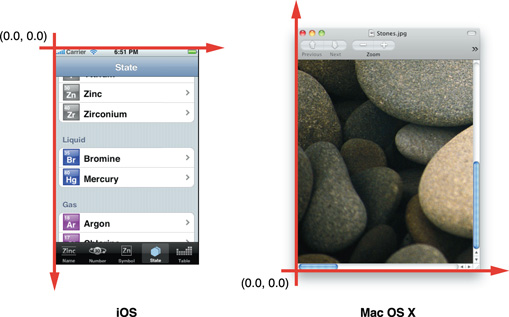
ios vs macos painting: coordinate systems
I think this image is more than enough to understand the difference:
Labels: apple, coordinate, feelthedifference, ios, macos, shit
February 9, 2012
The correct russian keyboard layout in macosx
"Нормальная" русская раскладка под macosx называется "Russian-PC", а не просто "Russian", как вы могли неправильно подумать :) иначе допсимволы (% например) скорее всего не будут совпадать с нарисованными.
March 29, 2011
Link: "Why MacOS X is unsuitable for web development"
http://developers.slashdot.org/story/11/03/28/2149206/Why-Mac-OS-X-Is-Unsuitable-For-Web-Development
no comments
no comments
Labels: epic fail, macos, OS, programming, shit
May 27, 2009
Major java (Un)Security in Ubuntu/Macos
Ubuntu maintainers impress me one more with their 'i dont care' attitude to security o their system. The first was the debian-specific change to packege openssl that lead to ALL SSL and TLS communications and SSH key generation actually unencrypted.
Now they keep the both versions of sun's 5 and 6 java in stable repository (packages sun-java5 and sun-java6)one minor release BEFORE fixing of major vulnerability (CVE-2008-5353: calendar deserialization). The sun fixed this back in Dec 2008 already (soon after bug was found). And of course they have released stable packages of Java both JDK and JRE.
Hey, Ubuntu repository maintainers, why don't you update sun java packages in repo? Why do you leave unprotecked all those who trust you?
To those Ubuntu users who care about security when surfing in browser, I advice you update java manually using sun'site (Downloads section): http://java.sun.com site AND don't forget to REMOVE ubuntu's packages before, using for example Synaptics. Just search for java and remove everything about Java then reinstall JRE/JDK using Sun site.
PS Vulnerable Java releases are: Sun JDK and JRE 6 Update 10 and earlier; JDK and JRE 5.0 Update 16 and earlier; and SDK and JRE 1.4.2_18 and earlier. To see version just type java -version in terminal console.
PPS Macos users are ALL vulnerable to this, because Apple maintains Java branch for their Macos by themselves and have not yet released update OR patch (!!!). Unfortunately, it seems that security is not priority of Apple.
PS Apple has fixed it. Please update your macs ASAP.
Now they keep the both versions of sun's 5 and 6 java in stable repository (packages sun-java5 and sun-java6)one minor release BEFORE fixing of major vulnerability (CVE-2008-5353: calendar deserialization). The sun fixed this back in Dec 2008 already (soon after bug was found). And of course they have released stable packages of Java both JDK and JRE.
Hey, Ubuntu repository maintainers, why don't you update sun java packages in repo? Why do you leave unprotecked all those who trust you?
To those Ubuntu users who care about security when surfing in browser, I advice you update java manually using sun'site (Downloads section): http://java.sun.com site AND don't forget to REMOVE ubuntu's packages before, using for example Synaptics. Just search for java and remove everything about Java then reinstall JRE/JDK using Sun site.
PS Vulnerable Java releases are: Sun JDK and JRE 6 Update 10 and earlier; JDK and JRE 5.0 Update 16 and earlier; and SDK and JRE 1.4.2_18 and earlier. To see version just type java -version in terminal console.
PPS Macos users are ALL vulnerable to this, because Apple maintains Java branch for their Macos by themselves and have not yet released update OR patch (!!!). Unfortunately, it seems that security is not priority of Apple.
PS Apple has fixed it. Please update your macs ASAP.
Labels: bug, CVE-2008-5353, java, macos, security, ubuntu, vulnerability
